Using Custom SIP Trunks
Overview
SIP (Session Initiation Protocol) Trunking allows you to link your existing business phone line or preferred telephony provider allocated phone number directly into Call Camp studio. This is the ideal solution if you want to continue managing your current phone lines or leverage new own phone line from telephony provider.
Types of SIP Trunks
There are two primary ways to authenticate your SIP Trunk with Call Camp. Depending on your provider's infrastructure and security requirements, you will either use fixed IP whitelisting or a traditional registration method.
IP-Based Authentication
The most secure and performant method for high-volume centers. Traffic is authorized based on our static IP addresses. No username or password is required for the handshake.
Registration-Based
Commonly used by standard VoIP providers. You provide a username, password, and registrar URL. Call Camp acts as the client and 'registers' with your provider.
What to ask from Provider
To ensure a smooth connection, you must request the following details from your telephony provider:
Adding Phone Number
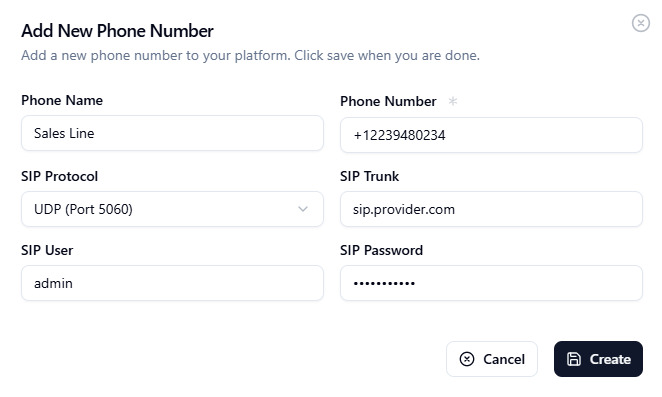
When adding a number in the Studio dashboard, you will be presented with the following fields. Ensure you have the details from your telephony provider ready.
Phone Name
Internal label to identify the number (e.g., "Main Sales Line").
Phone Number
The actual DID in E.164 format (e.g., +1234567890).
SIP Protocol
Choose between UDP, TCP, or TLS based on carrier support (Default is UDP).
SIP Trunk
The Gateway URL or IP provided by your carrier.
SIP User & Password
Auth credentials required only for Registration-based trunks.
Security Recommendation
Wherever possible, use Registration-Based Authentication. This method provides the highest compatibility with modern telephony providers and simplifies the setup process by using secure credentials for automated registration.
Need more assistance?
Whether you have a feature request, need technical support, or have a cooperation idea in mind - we're all ears. Let's build the future of voice calling AI together.